Page Not Found
Sorry, but the page you were trying to view does not exist.
A list of all the posts and pages found on the site. For you robots out there, there is an XML version available for digesting as well.
Sorry, but the page you were trying to view does not exist.
I am Christian Daniele, Chris for everyone. In this website you will find different resources about me and my work. I am a second-year PhD student at University of Genoa and Université Côte d’Azur since March 2025, supervised by Luca Calatroni, Samuel Vaiter and Silvia Villa.
My research focuses primarily on first-order optimization methods and inverse problems. In particular, I am working on hybrid frameworks for solving inverse problems, integrating neural networks with classical optimization algorithms to enhance reconstructive accuracy and computational efficiency.
Before starting the PhD, I studied at University of Genoa, completing a Bachelor’s Degree in Mathematics and a Master’s Degree in Applied Mathematics. I have also been an intern at CNRS, Sophia Antipolis, France under the supervision of Luca Calatroni and Samuel Vaiter.
I love sports! In particular, beach volleyball, volleyball, tennis, and football. If you happen to meet me at a conference, don’t hesitate to invite me to play—whatever the sport, count me in!
Published:
From July 27 to July 31, 2026, we successfully held the intensive PhD and Master’s course “Computational Imaging & Learning: From Physics to Data-Driven Methods” at Universidad de la República (UdelaR) in Montevideo, Uruguay.
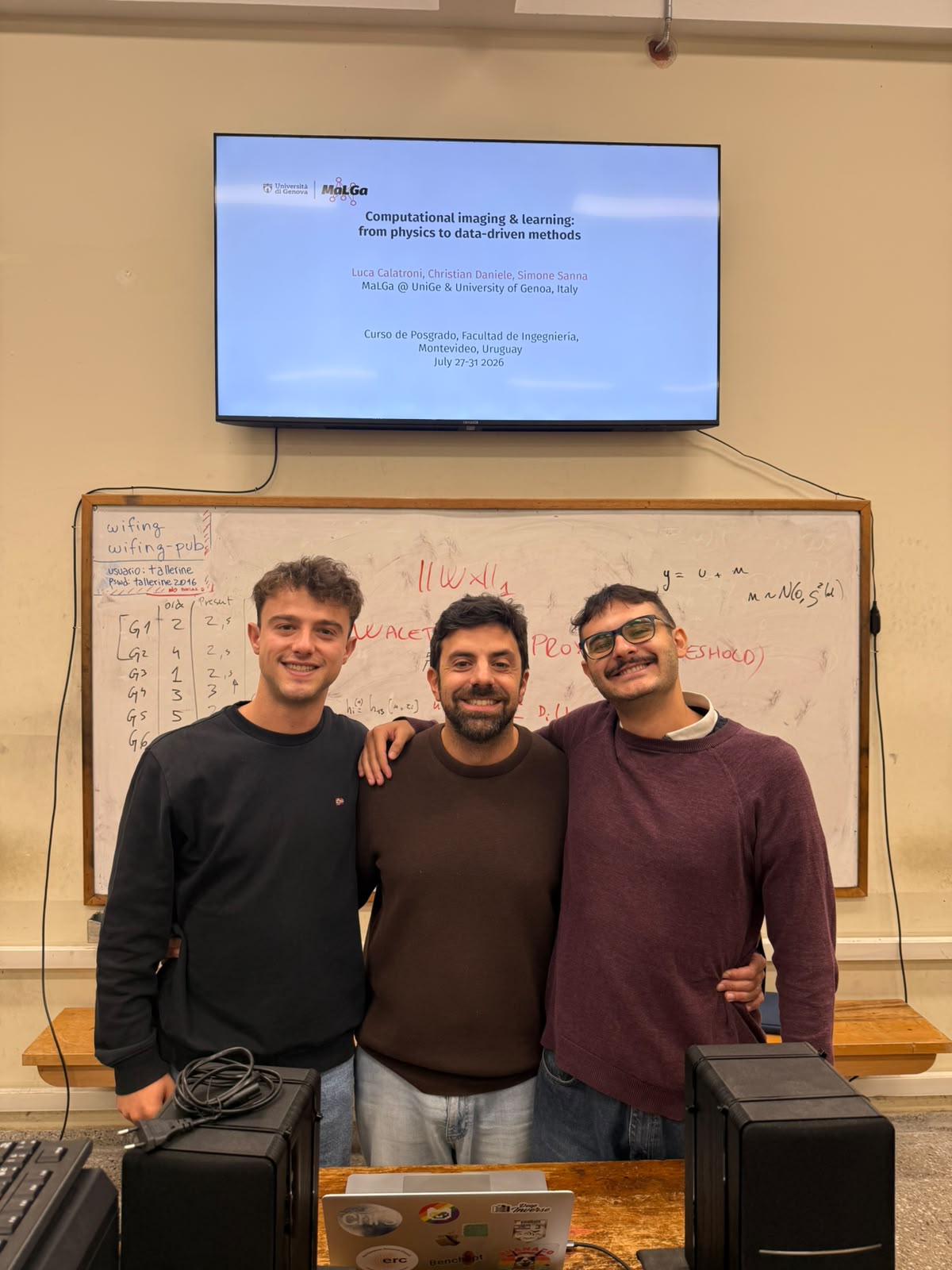 The teaching team: Luca Calatroni, Christian Daniele, and Simone Sanna.
During this one-week school, we covered the mathematical foundations of physics-based inverse problems, forward modeling, and modern data-driven / hybrid reconstruction methods.
Each day combined theoretical morning lectures with hands-on afternoon practical labs using Python and PyTorch notebooks (ranging from CT reconstruction and Plug-and-Play methods to Deep Equilibrium Models).
A big thank you to all the PhD candidates and Master’s students in Mathematics, Engineering, and Computer Science who participated and made the school such an engaging experience!
You can find the full syllabus and daily schedule on the dedicated Teaching page.
A variety of common markup showing how the theme styles them.
Single line blockquote:
Quotes are cool.
| Entry | Item | |
|---|---|---|
| John Doe | 2016 | Description of the item in the list |
| Jane Doe | 2019 | Description of the item in the list |
| Doe Doe | 2022 | Description of the item in the list |
| Header1 | Header2 | Header3 |
|---|---|---|
| cell1 | cell2 | cell3 |
| cell4 | cell5 | cell6 |
| cell1 | cell2 | cell3 |
| cell4 | cell5 | cell6 |
| Foot1 | Foot2 | Foot3 |
Make any link standout more when applying the .btn class.
Watch out! You can also add notices by appending {: .notice} to a paragraph.
This is an example of a link.
The abbreviation CSS stands for “Cascading Style Sheets”.
“Code is poetry.” —Automattic
You will learn later on in these tests that word-wrap: break-word; will be your best friend.
This tag will let you strikeout text.
The emphasize tag should italicize text.
This tag should denote inserted text.
This scarcely known tag emulates keyboard text, which is usually styled like the <code> tag.
This tag styles large blocks of code.
.post-title {
  margin: 0 0 5px;
  font-weight: bold;
  font-size: 38px;
  line-height: 1.2;
  and here's a line of some really, really, really, really long text, just to see how the PRE tag handles it and to find out how it overflows;
}
Developers, developers, developers…
–Steve Ballmer
This tag shows bold text.
Getting our science styling on with H2O, which should push the “2” down.
Still sticking with science and Isaac Newton’s E = MC2, which should lift the 2 up.
This allows you to denote variables.
Sorry, but the page you were trying to view does not exist.
I am Christian Daniele, Chris for everyone. In this website you will find different resources about me and my work. I am a second-year PhD student at University of Genoa and Université Côte d’Azur since March 2025, supervised by Luca Calatroni, Samuel Vaiter and Silvia Villa.
My research focuses primarily on first-order optimization methods and inverse problems. In particular, I am working on hybrid frameworks for solving inverse problems, integrating neural networks with classical optimization algorithms to enhance reconstructive accuracy and computational efficiency.
Before starting the PhD, I studied at University of Genoa, completing a Bachelor’s Degree in Mathematics and a Master’s Degree in Applied Mathematics. I have also been an intern at CNRS, Sophia Antipolis, France under the supervision of Luca Calatroni and Samuel Vaiter.
I love sports! In particular, beach volleyball, volleyball, tennis, and football. If you happen to meet me at a conference, don’t hesitate to invite me to play—whatever the sport, count me in!
Published:
From July 27 to July 31, 2026, we successfully held the intensive PhD and Master’s course “Computational Imaging & Learning: From Physics to Data-Driven Methods” at Universidad de la República (UdelaR) in Montevideo, Uruguay.
The teaching team: Luca Calatroni, Christian Daniele, and Simone Sanna.
During this one-week school, we covered the mathematical foundations of physics-based inverse problems, forward modeling, and modern data-driven / hybrid reconstruction methods.
Each day combined theoretical morning lectures with hands-on afternoon practical labs using Python and PyTorch notebooks (ranging from CT reconstruction and Plug-and-Play methods to Deep Equilibrium Models).
A big thank you to all the PhD candidates and Master’s students in Mathematics, Engineering, and Computer Science who participated and made the school such an engaging experience!
You can find the full syllabus and daily schedule on the dedicated Teaching page.
A variety of common markup showing how the theme styles them.
Single line blockquote:
Quotes are cool.
| Entry | Item | |
|---|---|---|
| John Doe | 2016 | Description of the item in the list |
| Jane Doe | 2019 | Description of the item in the list |
| Doe Doe | 2022 | Description of the item in the list |
| Header1 | Header2 | Header3 |
|---|---|---|
| cell1 | cell2 | cell3 |
| cell4 | cell5 | cell6 |
| cell1 | cell2 | cell3 |
| cell4 | cell5 | cell6 |
| Foot1 | Foot2 | Foot3 |
Make any link standout more when applying the .btn class.
Watch out! You can also add notices by appending {: .notice} to a paragraph.
This is an example of a link.
The abbreviation CSS stands for “Cascading Style Sheets”.
“Code is poetry.” —Automattic
You will learn later on in these tests that word-wrap: break-word; will be your best friend.
This tag will let you strikeout text.
The emphasize tag should italicize text.
This tag should denote inserted text.
This scarcely known tag emulates keyboard text, which is usually styled like the <code> tag.
This tag styles large blocks of code.
.post-title {
  margin: 0 0 5px;
  font-weight: bold;
  font-size: 38px;
  line-height: 1.2;
  and here's a line of some really, really, really, really long text, just to see how the PRE tag handles it and to find out how it overflows;
}
Developers, developers, developers…
–Steve Ballmer
This tag shows bold text.
Getting our science styling on with H2O, which should push the “2” down.
Still sticking with science and Isaac Newton’s E = MC2, which should lift the 2 up.
This allows you to denote variables.
{% include base_path %} {% for post in site.pages %} {% include archive-single.html %} {% endfor %}
{% include base_path %} {% include group-by-array collection=site.posts field=”categories” %}
{% for category in group_names %} {% assign posts = group_items[forloop.index0] %}
{% for post in posts %} {% include archive-single.html %} {% endfor %} {% endfor %}
{% include base_path %} {% capture written_label %}’None’{% endcapture %}
{% for collection in site.collections %} {% unless collection.output == false or collection.label == “posts” %} {% capture label %}{{ collection.label }}{% endcapture %} {% if label != written_label %} <h2 id="{{ label | slugify }}" class="archive__subtitle">{{ label }}</h2> {% capture written_label %}{{ label }}{% endcapture %} {% endif %} {% endunless %} {% for post in collection.docs %} {% unless collection.output == false or collection.label == “posts” %} {% include archive-single.html %} {% endunless %} {% endfor %} {% endfor %}
{% include base_path %}
/*
@import “vendor/breakpoint/breakpoint”,
"themes",
"theme/{{ site.site_theme | default: 'default' | append: '_light' }}",
"theme/{{ site.site_theme | default: 'default' | append: '_dark' }}",

"include/mixins",
"vendor/susy/susy",

"layout/reset",
"layout/base",

"include/utilities",
"layout/tables",
"layout/buttons",
"layout/notices",
"layout/masthead",
"layout/navigation",
"layout/footer",
"syntax",

"layout/forms",

"layout/page",
"layout/archive",
"layout/sidebar",
"layout/json_cv",

"vendor/font-awesome/fontawesome",
"vendor/font-awesome/solid",
"vendor/font-awesome/brands" ;
{% include toc %}
 .
.Your CV can be written using either Markdown (preview) or generated via JSON (preview) and the layouts are slightly different. You can update the path to the one being used in _data/navigation.yml with the JSON formatted CV being hidden by default.
Support for MathJax (version 3.* via jsDelivr, documentation) is included in the template:
\[\displaylines{ \nabla \cdot E= \frac{\rho}{\epsilon_0} \\\ \nabla \cdot B=0 \\\ \nabla \times E= -\partial_tB \\\ \nabla \times B = \mu_0 \left(J + \varepsilon_0 \partial_t E \right) }\]The default delimiters of $$...$$ and \\[...\\] are supported for displayed mathematics, while \\(...\\) should be used for in-line mathematics (ex., \(a^2 + b^2 = c^2\))
Note that since Academic Pages uses Markdown which cases some interference with MathJax and LaTeX for escaping characters and new lines, although some workarounds exist. In some cases, such as when you are including MathJax in a citation field for publications, it may be necessary to use \(...\) for inline delineation.
Academic Pages includes support for Mermaid diagrams (version 11.* via jsDelivr) and in addition to their tutorials and GitHub documentation the basic syntax is as follows:
    ```mermaid
    graph LR
    A-->B
    ```
Which produces the following plot with the default theme applied:
graph LR
A-->B
While a more advanced plot with the forest theme applied looks like the following:
---
config:
  theme: 'forest'
---
graph TD;
    A-->B;
    A-->C;
    B-->D;
    C-->D;
Academic Pages includes support for Plotly diagrams via a hook in the Markdown code elements, although those that are comfortable with HTML and JavaScript can also access it via those routes.
In order to render a Plotly plot via Markdown the relevant plot data need to be added as follows:
    ```plotly
    {
      "data": [
        {
          "x": [1, 2, 3, 4],
          "y": [10, 15, 13, 17],
          "type": "scatter"
        },
        {
          "x": [1, 2, 3, 4],
          "y": [16, 5, 11, 9],
          "type": "scatter"
        }
      ]
    }
    ```
Important! Since the data is parsed as JSON all of the keys will need to be quoted for the plot to render. The use of a tool like JSONLint to check syntax is highly recommended.
Which produces the following:
{
  "data": [
    {
      "x": [1, 2, 3, 4],
      "y": [10, 15, 13, 17],
      "type": "scatter"
    },
    {
      "x": [1, 2, 3, 4],
      "y": [16, 5, 11, 9],
      "type": "scatter"
    }
  ]
}
Essentially what is taking place is that the Plotly attributes are being taken from the code block as JSON data, parsed, and passed to Plotly along with a theme that matches the current site theme (i.e., a light theme, or a dark theme). This allows all plots that can be described via the data attribute to rendered with some limitations for the theme of the plot.
{
  "data": [
    {
      "x": [1, 2, 3, 4, 5],
      "y": [1, 6, 3, 6, 1],
      "mode": "markers",
      "type": "scatter",
      "name": "Team A",
      "text": ["A-1", "A-2", "A-3", "A-4", "A-5"],
      "marker": { "size": 12 }
    },
    {
      "x": [1.5, 2.5, 3.5, 4.5, 5.5],
      "y": [4, 1, 7, 1, 4],
      "mode": "markers",
      "type": "scatter",
      "name": "Team B",
      "text": ["B-a", "B-b", "B-c", "B-d", "B-e"],
      "marker": { "size": 12 }
    }
  ],
  "layout": {
    "xaxis": {
      "range": [ 0.75, 5.25 ]
    },
    "yaxis": {
      "range": [0, 8]
    },
    "title": {"text": "Data Labels Hover"}
  }
}
{
  "data": [{
      "x": [1, 2, 3],
      "y": [4, 5, 6],
      "type": "scatter"
    },
    {
      "x": [20, 30, 40],
      "y": [50, 60, 70],
      "xaxis": "x2",
      "yaxis": "y2",
      "type": "scatter"
  }],
  "layout": {
    "grid": {
      "rows": 1,
      "columns": 2,
      "pattern": "independent"
    },
    "title": {
      "text": "Simple Subplot"
    }
  }
}
{
  "data": [{
		"z": [[10, 10.625, 12.5, 15.625, 20],
          [5.625, 6.25, 8.125, 11.25, 15.625],
          [2.5, 3.125, 5.0, 8.125, 12.5],
          [0.625, 1.25, 3.125, 6.25, 10.625],
          [0, 0.625, 2.5, 5.625, 10]],
		"type": "contour"
	}],
  "layout": {
    "title": {
      "text": "Basic Contour Plot"
    }
  }
}
Academic Pages uses kramdown for Markdown rendering, which has some differences from other Markdown implementations such as GitHub’s. In addition to this guide, please see the kramdown Syntax page for full documentation.
Single line blockquote:
Quotes are cool.
| Entry | Item | |
|---|---|---|
| John Doe | 2016 | Description of the item in the list |
| Jane Doe | 2019 | Description of the item in the list |
| Doe Doe | 2022 | Description of the item in the list |
| Header1 | Header2 | Header3 |
|---|---|---|
| cell1 | cell2 | cell3 |
| cell4 | ce | |
| ll5 | cell6 | |
| cell1 | cell2 | cell3 |
| cell4 | cell5 | cell6 |
| Foot1 | Foot2 | Foot3 |
Make any link standout more when applying the .btn class.
Basic notices or call-outs are supported using the following syntax:
**Watch out!** You can also add notices by appending `{: .notice}` to the line following paragraph.
{: .notice}
which wil render as:
Watch out! You can also add notices by appending {: .notice} to the line following paragraph.
Footnotes can be useful for clarifying points in the text, or citing information.1 Markdown support numeric footnotes, as well as text as long as the values are unique.2
This is the regular text.[^1] This is more regular text.[^note]

[^1]: This is the footnote itself.
[^note]: This is another footnote.
This is an example of a link.
The abbreviation CSS stands for “Cascading Style Sheets”.
“Code is poetry.” —Automattic
You will learn later on in these tests that word-wrap: break-word; will be your best friend.
You can also write larger blocks of code with syntax highlighting supported for some languages, such as Python:
print('Hello World!')
or R:
print("Hello World!", quote = FALSE)
The HTML <details> tag works well with Markdown and allows you to include collapsible sections, see W3Schools for more information on how to use the tag.
The source code:
<details>
  <summary>Collapsed by default</summary>
  This section was collapsed by default!
</details>
Or, you can leave a section open by default by including the open attribute in the tag:
The emphasize tag should italicize text.
This tag should denote inserted text.
This scarcely known tag emulates keyboard text, which is usually styled like the <code> tag.
This tag styles large blocks of code.
.post-title {
  margin: 0 0 5px;
  font-weight: bold;
  font-size: 38px;
  line-height: 1.2;
  and here's a line of some really, really, really, really long text, just to see how the PRE tag handles it and to find out how it overflows;
}
Developers, developers, developers…
–Steve Ballmer
This tag will let you strikeout text.
This tag shows bold text.
Getting our science styling on with H2O, which should push the “2” down.
Still sticking with science and Isaac Newton’s E = MC2, which should lift the 2 up.
This allows you to denote variables.
Footnotes
The footnotes in the page will be returned following this line, return to the section on Markdown Footnotes.
This is a page not in the menu. You can use markdown in this page.
{% include base_path %} {% for post in site.pages %} {% include archive-single.html %} {% endfor %}
<!DOCTYPE html>
Find your optimal team based on type coverage, levels & preferences
Select at least 6 Pokémon from your collection, then click Suggest Squads to get type-optimized team recommendations.